Everyone has lived this moment. You call a company with a simple question, and a recorded voice starts reading a list. Press 1 for this, press 2 for that, press 7 for something you have never heard of. You press a number, get a second menu, then a third. Four minutes in, you still have not spoken to a person, and you have started jabbing zero and muttering at your phone. When you finally reach someone, they ask you to repeat everything the system already collected.
That experience has a name. It is a badly designed IVR, and it quietly costs businesses customers every single day. A study cited by TCN found that 68 percent of Americans name long hold times and disconnections as their top frustration when calling a business, and nearly two thirds are annoyed when one issue bounces them between multiple departments.
Here is the part most business owners miss: the technology is almost never the problem. A hosted IVR on a modern cloud phone system is remarkably capable. The problem is strategy. The same tool that infuriates callers at one company delights them at another, because one business designed its call menu around the org chart and the other designed it around the caller.
After more than 25 years of building hosted VoIP phone systems for businesses, schools, and government agencies across the Carolinas, our team at Carolina Digital Phone has configured hundreds of IVR call flows. This article shares what actually works, what quietly drives callers away, and how to understand the difference between a traditional IVR and the new generation of AI receptionists, because they are very different tools.
What is an IVR, in plain English?
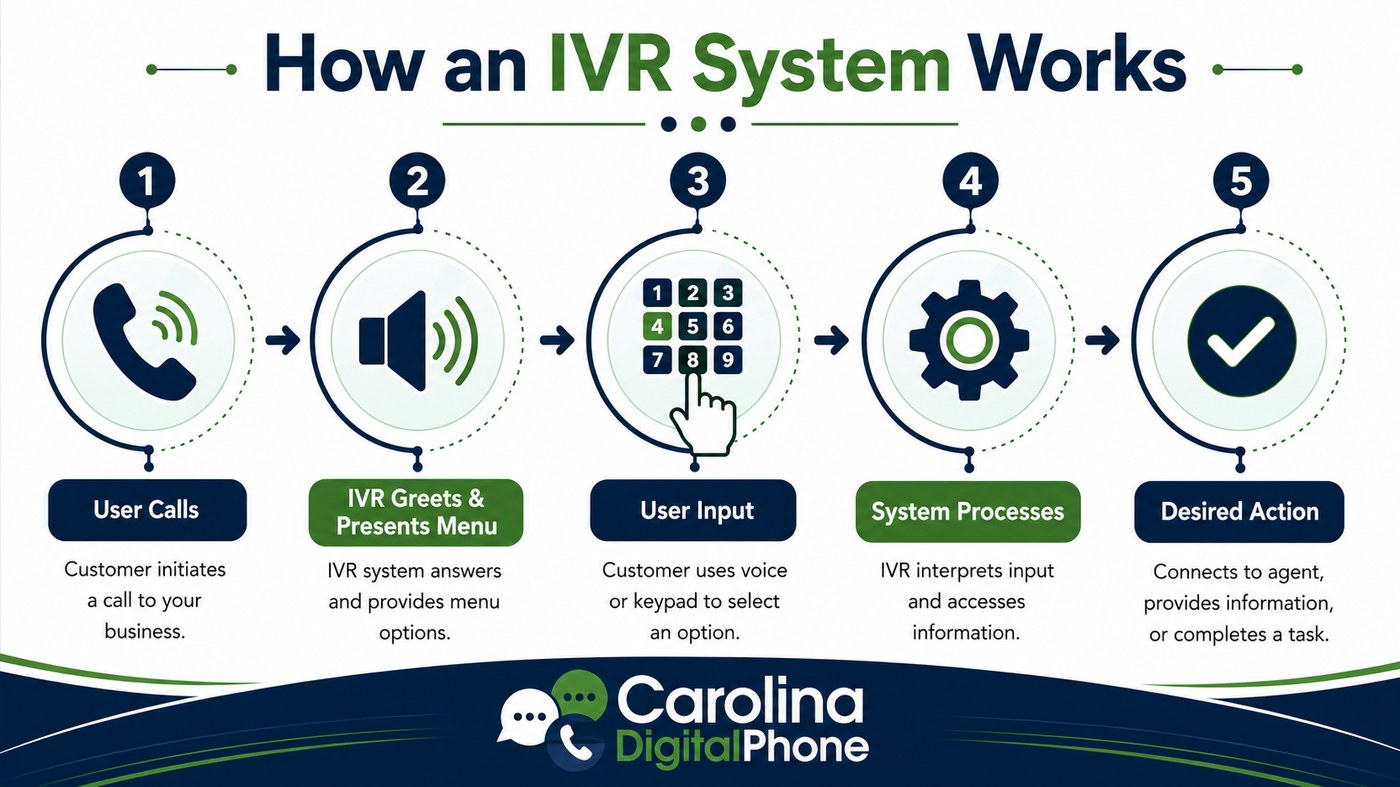
IVR stands for Interactive Voice Response. It is the automated system on your business phone line that greets callers, presents menu options, accepts keypad presses or spoken responses, and routes each call to the right person, department, or self-service action. On a hosted telephone service, the IVR lives in the cloud rather than in a dusty closet, which means you can change greetings, menus, schedules, and routing rules in minutes without touching hardware.
A well built IVR does five jobs at once. It answers every call instantly, 24 hours a day. It sorts callers so your sales calls reach sales and your support calls reach support. It handles simple requests like hours, directions, and payment lines without using staff time. It presents a professional, consistent brand to every caller. And it collects data about why people call, which is a goldmine most small businesses never open.
Why the right IVR strategy pays for itself
When an IVR is designed around real caller needs, the results show up on both sides of the phone line. Callers get faster answers, shorter holds, and fewer transfers. Your team spends its day on calls that actually need a human, instead of playing switchboard operator. Industry research consistently shows that a well designed IVR can resolve a large share of routine inquiries on its own while meaningfully lowering operating costs, and consulting firms like Kenway Consulting have documented how IVR analytics reveal exactly where callers abandon, transfer, or get stuck.
There is also a psychological dividend. Researchers who study the psychology of waiting have found that callers consistently overestimate how long they have been on hold, especially in silence, and that clear expectations like queue position announcements and callback offers dramatically reduce perceived wait time. In other words, a thoughtful IVR does not just route calls. It manages how waiting feels.
IVR vs. auto attendant: not the same thing
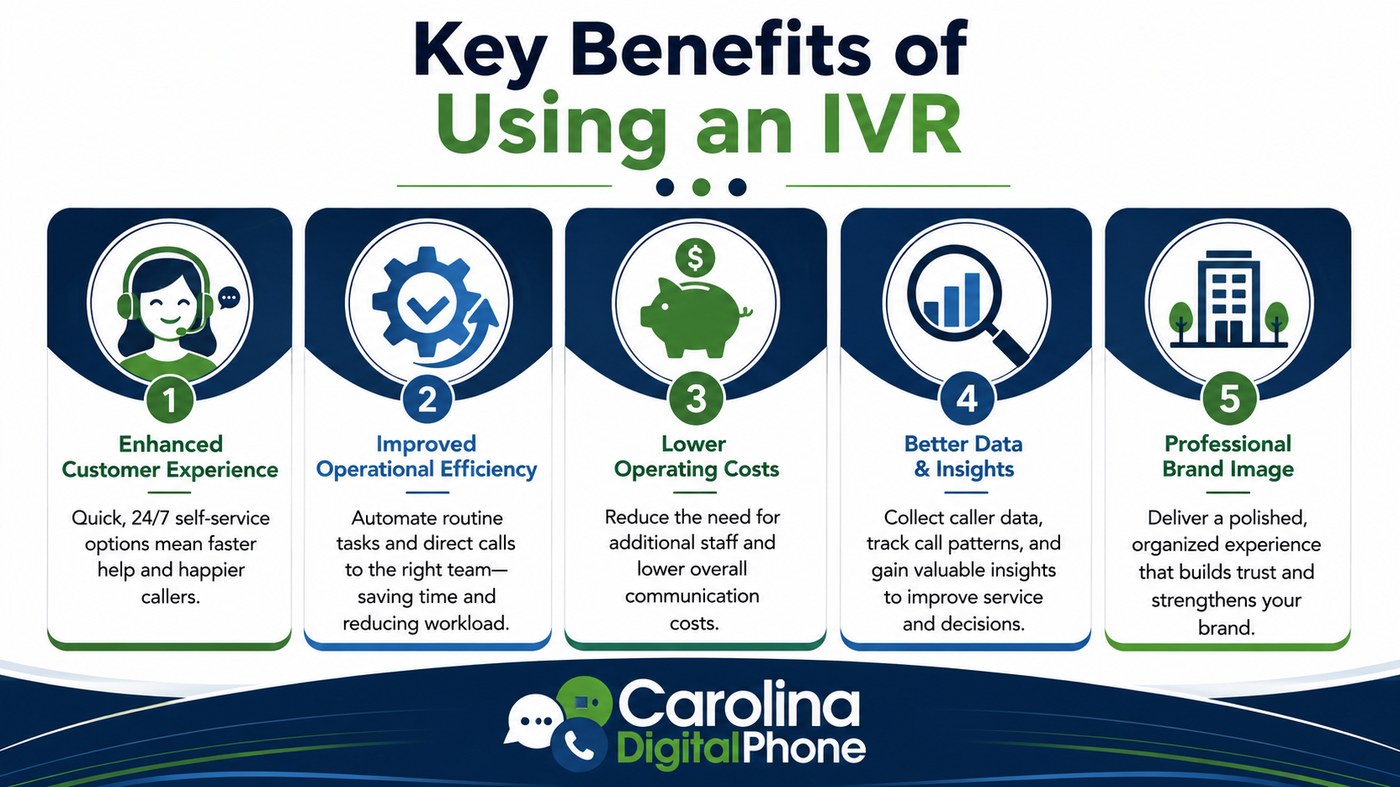
These two terms get used interchangeably, and the confusion causes businesses to buy the wrong tool. An auto attendant is the simpler cousin. It plays a greeting, reads a short menu, and transfers the call. Press 1 for sales, press 2 for support, done. It does not interact beyond that, it does not connect to your data, and it cannot complete tasks.
A true IVR goes further. It can accept voice input as well as keypad presses, look up information in connected systems, and let callers complete simple self-service tasks like checking an order status, making a payment, or confirming an appointment without ever reaching an agent. For many small businesses, a clean auto attendant is genuinely all they need. For businesses with meaningful call volume or repetitive inquiries, an IVR starts earning its keep quickly.
The bigger distinction: traditional IVR vs. an AI receptionist
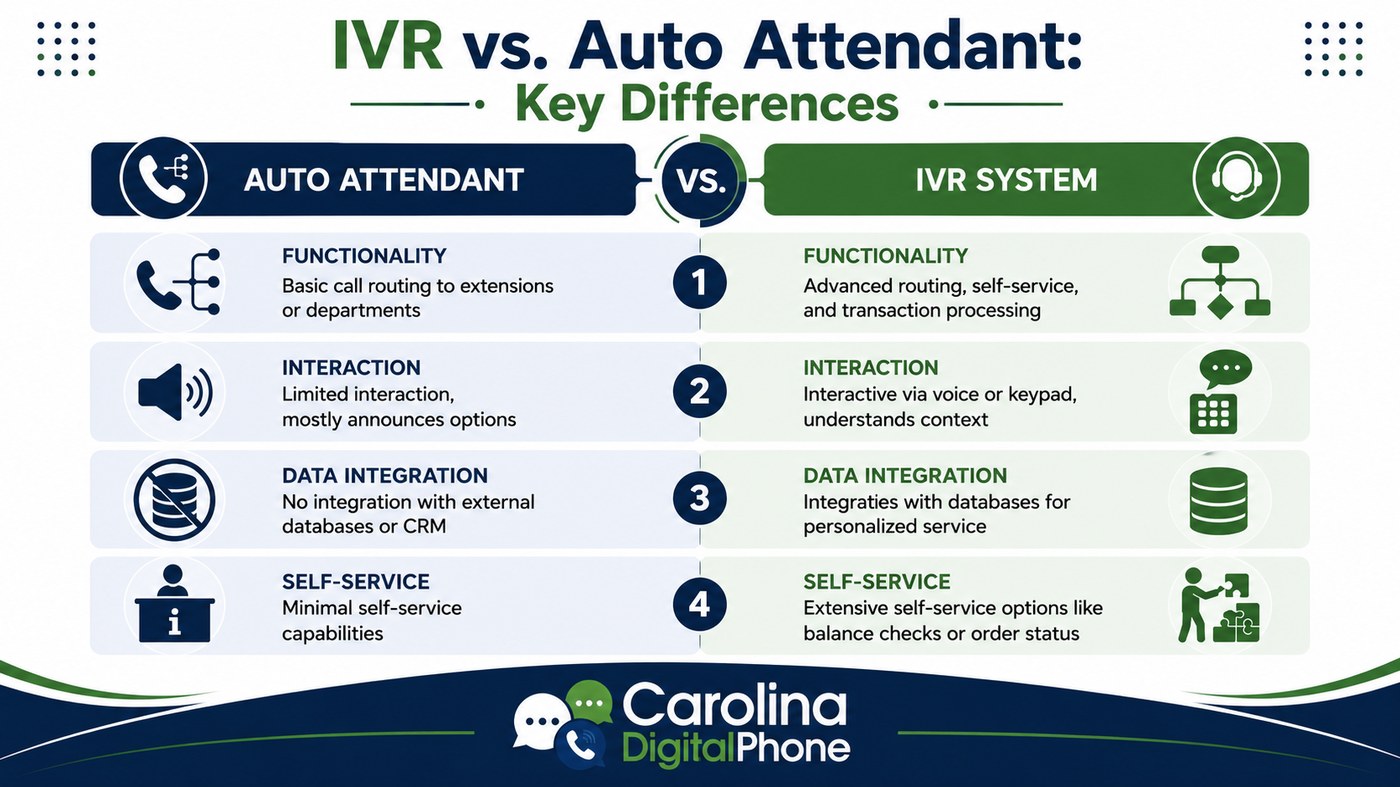
This is where the market has genuinely changed in the last two years, and where we see the most confusion when business owners call us. A traditional hosted IVR and an AI receptionist sound similar on a sales page, but they behave very differently on a live call. Understanding the difference will save you from buying more than you need, or less than your callers deserve.
A traditional IVR listens and routes
A traditional IVR follows a script you design. It presents fixed menus, listens for a keypad press or a limited set of spoken phrases, and follows the branch you built. It is predictable, reliable, and inexpensive. It can hand off to self-service actions and pull basic information from connected systems, but it does not understand conversation. If a caller says something outside the menu, the IVR politely repeats the options. The intelligence lives in your design, not in the system.
An AI receptionist understands and acts
An AI receptionist is a different animal. Instead of reading a menu, it opens with a natural question like "How can I help you today?" and actually understands the answer. A caller can say "I need to reschedule Thursday's appointment to sometime next week" and the AI receptionist grasps the intent, checks the calendar, offers open times, books the change, and sends a confirmation text. It remembers context within the call, handles follow-up questions, connects to your CRM, scheduling, and ticketing systems, qualifies leads, and transfers to a human with notes attached so the caller never repeats themselves.
The simplest way we explain it: a traditional IVR is a well organized hallway with clearly labeled doors. An AI receptionist is a knowledgeable person standing in that hallway who can walk you where you need to go, answer your questions along the way, and handle the paperwork before you arrive. Both have their place. A dental office fielding thirty calls a day about appointments and insurance gets transformative value from an AI receptionist. A four person machine shop may be perfectly served by a crisp two option menu.
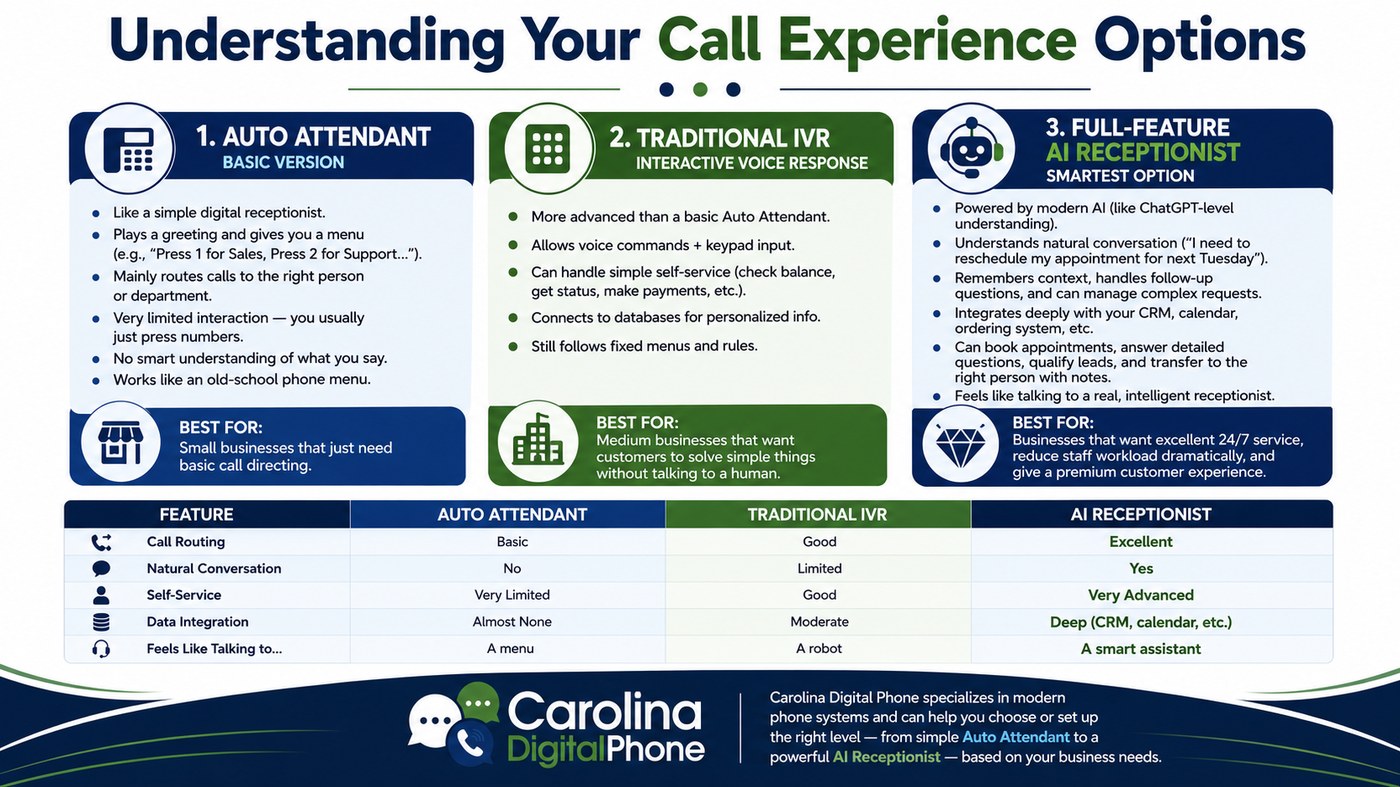
If the AI receptionist column looks like your business, our AI Agent page walks through exactly how Carolina Digital Phone deploys conversational AI call handling on the same hosted platform as your phones, so it is one system and one local support team rather than another vendor bolted on.
Nine rules for an IVR that will not frustrate your callers
Whether you run a simple auto attendant, a full IVR, or an AI receptionist with an IVR safety net, the same design principles separate the systems people tolerate from the systems people appreciate. These are the rules we apply on every deployment.
1Keep the main menu to five options or fewer
Human working memory holds about four to seven items. When your greeting lists eight choices, callers forget option one before you reach option six. Three to five clear, distinct choices per level is the sweet spot, with no more than two levels of nesting. If you need three levels, your routing strategy is too complicated for a phone menu.
2Put your most requested option first
Pull your call reports and order the menu by real call volume, not by your org chart. If 60 percent of your callers want scheduling, scheduling is option 1. Every second a caller waits to hear the option they need is a second of accumulating frustration.
3Make the path to a human obvious
Callers should always be able to press 0 to reach a person, and your greeting should say so. Hiding the human option is the single fastest way to earn a one star review. Most callers who know the exit exists never use it, but knowing it exists keeps them calm inside the menu.
4Respect the caller's time on hold
Offer estimated wait times, queue position announcements, and a callback option that holds the caller's place in line. Verizon's guidance on IVR improvement makes the same point: giving customers choices about how they wait puts them back in control, and controlled waiting feels dramatically shorter.
5Write greetings the way people talk
Retire "your call is very important to us" and "please listen carefully as our menu options have changed." Nobody believes either sentence. Use a warm, brief greeting with your business name, then get straight to the options. Shorter greetings measurably reduce abandonment.
6Never make a caller repeat information
If your IVR collects an account number or the reason for the call, that context must travel with the transfer. Connecting your phone system to your CRM means the agent answers already knowing who is calling and why. Forcing people to repeat themselves is the most cited IVR complaint in nearly every customer study.
7Match the menu to the clock
Your IVR should behave differently at 2 PM on a Tuesday than at 2 AM on a Sunday. After-hours callers need your hours, your emergency path, and a way to leave a message that actually reaches someone in the morning. A cloud based hosted phone system makes time-of-day routing a checkbox, not a project.
8Call your own number every month
This is the cheapest quality audit in business. Dial in, navigate every branch, press wrong buttons on purpose, and time the path to a human. Then have someone unfamiliar with your company do the same. Stale prompts that mention old hours, departed employees, or discontinued services train callers to distrust your whole menu.
9Watch the numbers and keep tuning
Track abandonment rate, transfer rate, and where callers bail out of the menu. A high transfer rate on one branch usually means the option label is confusing. An IVR is not a set-and-forget appliance. It is a customer experience touchpoint that deserves a quarterly review, the same as your website.
The one sentence version: design the menu around why people actually call you, keep it short, always leave the door to a human wide open, and check your own front door regularly.
Why local expertise changes the outcome
Here is an honest observation from a quarter century in this business. The national VoIP platforms will happily sell you an IVR builder and a knowledge base article, then wish you luck. The software is fine. What is missing is the person who has configured this a few hundred times and knows, for example, that a pediatric practice needs a nurse triage branch that jumps the queue, or that a property management company should route after-hours maintenance emergencies straight to the on-call tech's mobile phone.
That judgment is what Carolina Digital Phone has been building since 2000, from our headquarters in downtown Greensboro. When you call us to design or fix an IVR, you are not opening a ticket in a queue. You reach an experienced local team, and when the question is technical, a senior engineer picks up the conversation without a multi-day escalation dance. There is never a wait to get a senior engineer working on your problem. Our clients across North Carolina, South Carolina, and Virginia will tell you that this is why they chose a local provider over a faceless national brand, and our 25 plus year history in business communications is the track record behind that promise.
If you are replacing a legacy PBX and want a cloud phone platform with IVR, intelligent call routing, mobile-ready calling, call center features, and white-glove setup, take a look at Carolina Digital Phone. The platform is built for growing businesses that need enterprise-grade call handling without turning phone administration into a full-time job, and it is backed by a trusted local partner who answers when you call.
Getting started: a practical path
If your current phone menu was set up years ago and never revisited, start with a listening exercise. Pull one week of call logs. Sort the reasons people call into five buckets or fewer. That list, in order of volume, is your new main menu. Record a fresh greeting under fifteen seconds, add a press-zero escape, set up business-hours and after-hours behavior, and connect caller information to whatever system your team uses daily. Then dial in and experience it yourself.
If your calls are heavy with repetitive questions, appointment traffic, or after-hours volume you are currently losing to voicemail, that is the signal to evaluate an AI receptionist layered on top of your hosted VoIP service. The economics have shifted quickly: conversational AI that cost enterprise money three years ago is now practical for a ten person business, and it captures the revenue hiding in the calls you miss.
Either way, the goal is the same. When a customer calls your business, the first thirty seconds should say "we were expecting you, and we are glad you called." That is what the right IVR strategy sounds like.