Call forwarding for business is the process of automatically redirecting incoming calls to another number or device so no customer reaches a dead end. Businesses using VoIP call forwarding report fewer missed calls and higher client satisfaction compared to traditional phone lines. That gap matters most for small and mid-sized businesses in the Carolinas, where a single missed call from a potential client can mean lost revenue. Carolina Digital Phone builds its hosted voice service around this reality, giving local businesses dependable call routing without complex IT setup or hidden fees. As your trusted local source for telephone, messaging, and AI Receptionist services for more than 25 years, we have configured these rules for thousands of lines and seen exactly where setups succeed and where they fail.
What do you need to set up call forwarding for a business line?
The prerequisites for business call forwarding are simpler than most owners expect. You need three things: a business phone number, a destination number to receive forwarded calls, and a phone system or VoIP service that supports forwarding rules. Traditional landline carriers offer basic forwarding, but VoIP forwarding costs are generally lower and the feature is typically included in the service plan with no extra hardware required. The FCC's own consumer guide to VoIP is a good primer if the technology is new to you.
Access to an administrative portal is the practical starting point. Most hosted phone systems give you a web-based dashboard where you create, edit, and activate forwarding rules without calling a technician. Carrier compatibility matters too. If your existing business line runs on a legacy PBX system, confirm that your VoIP provider can port your number before you configure any rules. Under FCC number portability rules, your current carrier cannot refuse to release your number, and simple ports must be processed in one business day.

The table below summarizes what you need and how long each step typically takes.
| Requirement | Details | Estimated Time |
|---|---|---|
| Business phone number | Existing line or new number from your VoIP provider | Already in place or 1 day to port |
| VoIP or hosted phone service | Cloud-based system with forwarding rule support | Account setup: under 30 minutes |
| Admin portal access | Web dashboard for creating and editing rules | Immediate after account activation |
| Destination number | Mobile, landline, or secondary office number | Ready before you configure rules |
| Forwarding rule configuration | Select type, enter destination, activate | Under 5 minutes per rule |
Pro Tip: Port your existing business number to a VoIP provider before setting up forwarding rules. This keeps your public-facing number consistent while giving you full control over routing.
How to set up call forwarding for business: step-by-step
Setting up a business call redirect starts with choosing the right forwarding type. The four main types serve different situations, and picking the wrong one is the most common setup mistake.
Unconditional forwarding sends every incoming call to a destination number immediately, bypassing your main line entirely. Use this when your office is closed for an extended period or when you want all calls to reach a mobile device.
Conditional forwarding routes calls only when a specific condition is met. Conditional forwarding types include busy signal, no answer, and offline, giving you more flexibility than traditional telephony. A Carolina contractor, for example, might set a no-answer rule so calls forward to a dispatcher after four rings.
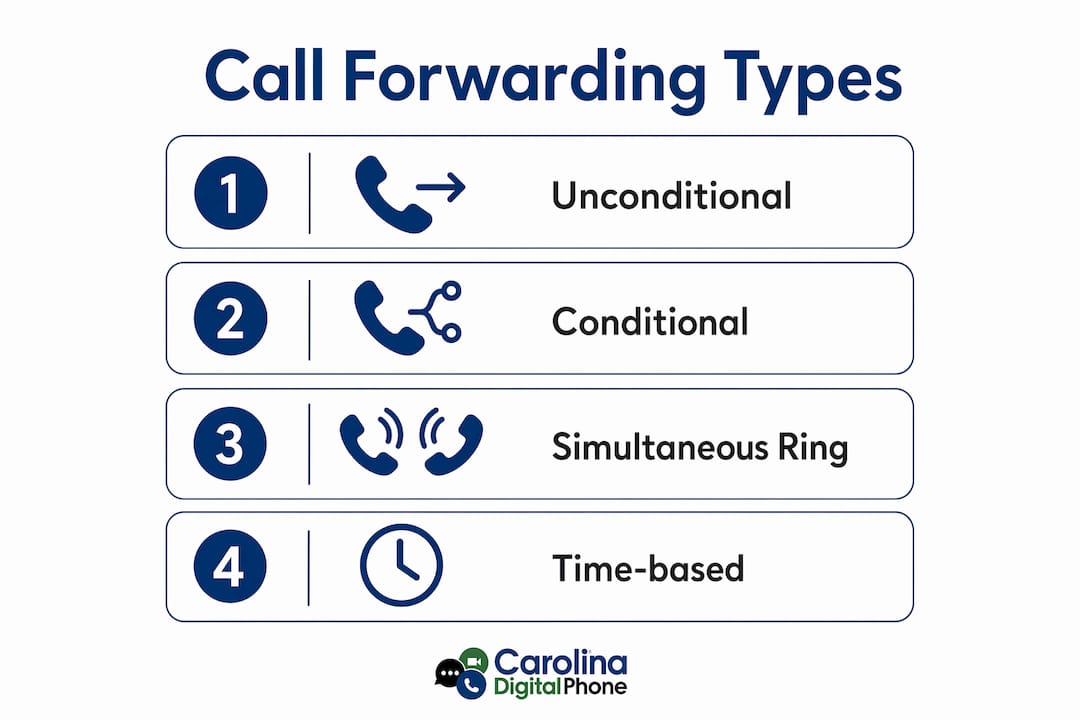
Simultaneous ring dials multiple numbers at once. The first person to answer takes the call. This works well for small sales teams where any available rep can respond.
Time-based routing directs calls according to a schedule. Calls during business hours go to your main team. After-hours calls go to an on-call number or an automated attendant. Time-based routing increases coverage and reduces the chance a customer reaches voicemail at 5:01 PM.
Step-by-step configuration
- Log in to your admin portal. Open your hosted phone system dashboard and navigate to the call forwarding or routing section.
- Select your forwarding type. Choose unconditional, conditional, simultaneous ring, or time-based based on your business need.
- Enter the destination number. Type the full number, including area code, where calls should land.
- Set conditions if applicable. For conditional rules, specify the trigger: busy, no answer after a set number of rings, or phone offline.
- Define time schedules for time-based rules. Set your business hours, lunch breaks, and after-hours windows. Most portals let you create separate schedules for weekdays and weekends.
- Test the rule before going live. Call your business number from a cell phone and confirm the call reaches the destination you set.
- Activate and monitor. Turn the rule on and check your call logs within the first 24 hours to catch any routing errors.
Pro Tip: Always test forwarding rules from a phone that is not connected to your office Wi-Fi. This simulates a real customer call and catches network-specific issues before they affect clients.
Want your call flow mapped for free?
A Carolina Digital Phone pre-sales voice engineer will sketch your ideal forwarding rules in one short call. Local, experienced, and no obligation.
Call (336) 544-4000What are common call forwarding problems and how do you fix them?
Forwarding loops are the most disruptive issue in call forwarding setup. A loop occurs when your main number forwards to a second number that forwards back to the first. Misconfigured rules causing loops or failed forwarding are the most common problems businesses encounter. The fix is straightforward: audit every forwarding rule in your portal and confirm no destination number points back to your main line.
Beyond loops, these issues appear most often:
- Calls going to voicemail instead of forwarding. Check that your forwarding rule is active and that the destination number is entered correctly with the full area code.
- Forwarding not triggering on busy signal. Confirm your VoIP plan supports busy-condition forwarding. Some entry-level plans only offer unconditional forwarding.
- Calls dropping during transfer. This usually points to a connectivity issue on the destination end, not the forwarding rule itself. Test your destination number's signal strength and internet connection.
- Wrong time zone applied to schedules. Most admin portals default to UTC. Set your time zone to Eastern Time for Carolina businesses before creating any time-based rules.
- Security exposure from open forwarding. Forwarding to an unmonitored number creates a gap where sensitive client calls go unrecorded. Set forwarding destinations only to verified business numbers, and review your rules quarterly.
Pro Tip: Keep a written log of every forwarding rule you create, including the date, the condition, and the destination. When something breaks, this log cuts your troubleshooting time in half.
Forwarding to voicemail is a specific risk worth calling out directly. 85% of callers never call back after reaching voicemail. That statistic means one misconfigured rule can quietly cost you clients without any obvious sign of failure.
What advanced features make call forwarding work harder for your business?
Basic call forwarding gets calls to the right number. Advanced call management solutions get calls to the right person at the right time with context attached. The difference between the two is measurable in customer experience.
VoIP call forwarding systems often integrate with CRM and collaboration tools, adding value beyond simple call redirection. When a forwarded call arrives with the caller's account history already visible to the rep, the conversation starts at a higher level. Carolina Digital Phone supports this kind of integration through its hosted voice platform, connecting your call routing with the tools your team already uses.
The table below shows the practical difference between basic and advanced forwarding feature categories.
| Feature Category | Basic Forwarding | Advanced Forwarding |
|---|---|---|
| Routing logic | Fixed destination number | Condition-based, time-based, and simultaneous ring |
| CRM integration | None | Call data syncs with customer records |
| Analytics and reporting | No call logs | Full call history, duration, and missed call reports |
| After-hours coverage | Manual activation | Automated schedule with custom messages |
| Remote team support | Single destination | Multiple destinations with priority order |
Remote teams benefit most from advanced routing. A Carolina business with staff working from Charleston, Columbia, and Greenville can route calls by department, skill, or availability without a physical office switchboard. Time-based routing handles after-hours coverage automatically, so no one has to remember to activate forwarding before leaving for the day.
Best practices for monitoring your call forwarding performance:
- Review call logs weekly during the first month after setup to catch routing errors early.
- Track missed call rates before and after enabling forwarding to measure the real impact.
- Update time-based schedules whenever your business hours change, including holidays.
- Assign one person as the owner of your forwarding rules so changes are tracked and intentional.
Key takeaways
Effective call forwarding for business requires the right VoIP system, correctly configured routing rules, and regular monitoring to protect customer satisfaction and prevent missed calls.
| Point | Details |
|---|---|
| Choose the right forwarding type | Match unconditional, conditional, simultaneous ring, or time-based routing to your actual business need. |
| Setup is fast with VoIP | Most forwarding rules activate in under 5 minutes through a web-based admin portal. |
| Voicemail is a retention risk | 85% of callers never call back after reaching voicemail, making live forwarding critical. |
| Advanced features multiply value | CRM integration and analytics turn call forwarding into a full call management tool. |
| Monitor rules regularly | Audit forwarding rules quarterly and update schedules whenever business hours change. |
Why call forwarding is more than a backup plan
I have worked with enough Carolina business owners to know that most treat call forwarding as a safety net. They set it up once, forget about it, and assume it is working. That assumption is expensive.
Call forwarding is not a backup plan. It is the front line of your customer communication. When a client in Columbia calls your office at 4:55 PM on a Friday and reaches a live person instead of voicemail, that interaction shapes their entire perception of your business. The technology behind that moment is a forwarding rule someone configured correctly and tested.
The shift from traditional telephony to VoIP forwarding changes what is possible. Traditional lines forward calls blindly. VoIP systems forward calls with intelligence: time-based schedules, CRM data, simultaneous ring across a distributed team. Businesses that treat forwarding as a configuration task rather than a communication strategy miss the real opportunity.
My honest advice: spend 30 minutes mapping your call flow before you touch a single setting. Write down who should answer calls at 9 AM on a Tuesday versus 6 PM on a Saturday. That map becomes your forwarding rules. The technology is the easy part. Knowing your own business well enough to route calls correctly is the work that actually matters.
Nicky Smith, Founder, Carolina Digital Phone
How Carolina Digital Phone handles call forwarding for your business
Carolina Digital Phone gives Carolina businesses a hosted phone service built for exactly this kind of setup. You get time-based routing, simultaneous ring, CRM-ready integration, and a real support team in North Carolina that picks up the phone when something needs fixing. For more than 25 years, Carolina Digital Phone has been the trusted local source for telephone, business messaging, and AI Receptionist services for businesses, schools, and government agencies across the Carolinas.
Setup takes minutes, not days. There are no hidden fees, no confusing contracts, and no waiting on hold with a national carrier. Carolina Digital Phone targets 99.99% uptime, so your forwarding rules stay active when your clients call. If you are ready to stop missing calls and start routing them with purpose, Carolina Digital Phone is the dependable local partner built for businesses like yours.
Your trusted local partner for over 25 years
Telephone, business texting, and AI Receptionist services from a Greensboro team that answers the phone. Ask us anything, from a single forwarding rule to a full call flow redesign.
Talk to a Real Voice EngineerFrequently Asked Questions
What is call forwarding for business?
Call forwarding for business is the automatic redirection of incoming calls from your main business number to another phone or device. It keeps customers connected to a live person even when your primary line is unavailable.
How long does it take to set up call forwarding?
Most VoIP-based forwarding rules take under 5 minutes to configure through an admin portal. No IT expertise or hardware installation is required.
What types of call forwarding does a business need?
Most businesses benefit from a combination of conditional forwarding for busy or no-answer situations and time-based routing for after-hours coverage. Simultaneous ring works well for small teams where any available rep can take the call.
Does call forwarding work with remote teams?
Yes. VoIP call forwarding routes calls to any number regardless of location, making it well-suited for distributed teams across multiple cities or home offices.
How much does business call forwarding cost?
VoIP call forwarding is typically included in a hosted phone service plan with no extra hardware cost, making it more affordable than traditional phone line forwarding.