Walk through almost any growing business and you will see the same scene. A phone rings at an empty desk while the person it was meant for is thirty feet away helping a customer, checking inventory, or standing in an exam room. Somebody jogs over, misses the call by two rings, and the customer lands in voicemail. Multiply that little moment by every day of the year and you are looking at real money walking out the door.
The fix is simpler than most owners expect: let the phone travel with the person. That is exactly what a VoIP WiFi phone does. It is a business handset that connects to your wireless network instead of a phone jack, so your staff carry their extension in a pocket or set it up anywhere there is WiFi coverage. No cable pull, no new wiring, no missed first contact.
The timing is right, too. The global VoIP market is projected to grow from roughly 176 billion dollars in 2026 to nearly 389 billion by 2034, and much of that momentum comes from businesses replacing wired legacy PBX hardware with flexible, cloud-based phone systems. In this guide, our team draws on more than 25 years of deploying hosted VoIP across the Carolinas to explain how VoIP WiFi phones work, what your network needs to make them shine, and why two new Yealink devices, the SIP-T87W desk phone and the AX83H wireless handset, are the ones we are most excited about this year.
What is a VoIP WiFi phone?
A VoIP WiFi phone is a business telephone that sends your voice over your wireless data network rather than a traditional copper phone line or an Ethernet cable. It registers to your hosted phone service just like a wired IP phone, with the same extension, the same voicemail, the same transfer and conference features. The only difference is how it reaches the network: over WiFi instead of a wire.
That one difference unlocks a lot. You can put a full-featured business phone in a conference room, a warehouse office, a garage bay, or a reception desk that has no network drop. You can hand a wireless handset to a floor supervisor, a nurse, or a property manager who never sits still. And because the phone talks to a cloud PBX, every routing rule, ring group, auto attendant, and voicemail-to-email feature of your hosted telephone service works exactly the same as it does on a desk phone.
How a VoIP WiFi phone connects, step by step
The whole journey takes a fraction of a second, but understanding the path helps you understand why network quality matters so much. The handset joins your wireless network, converts your voice into digital packets, and sends those packets over your internet connection to the cloud PBX. The PBX applies your call logic and delivers the call to its destination, whether that is another extension down the hall, a mobile phone, or a landline across the country.
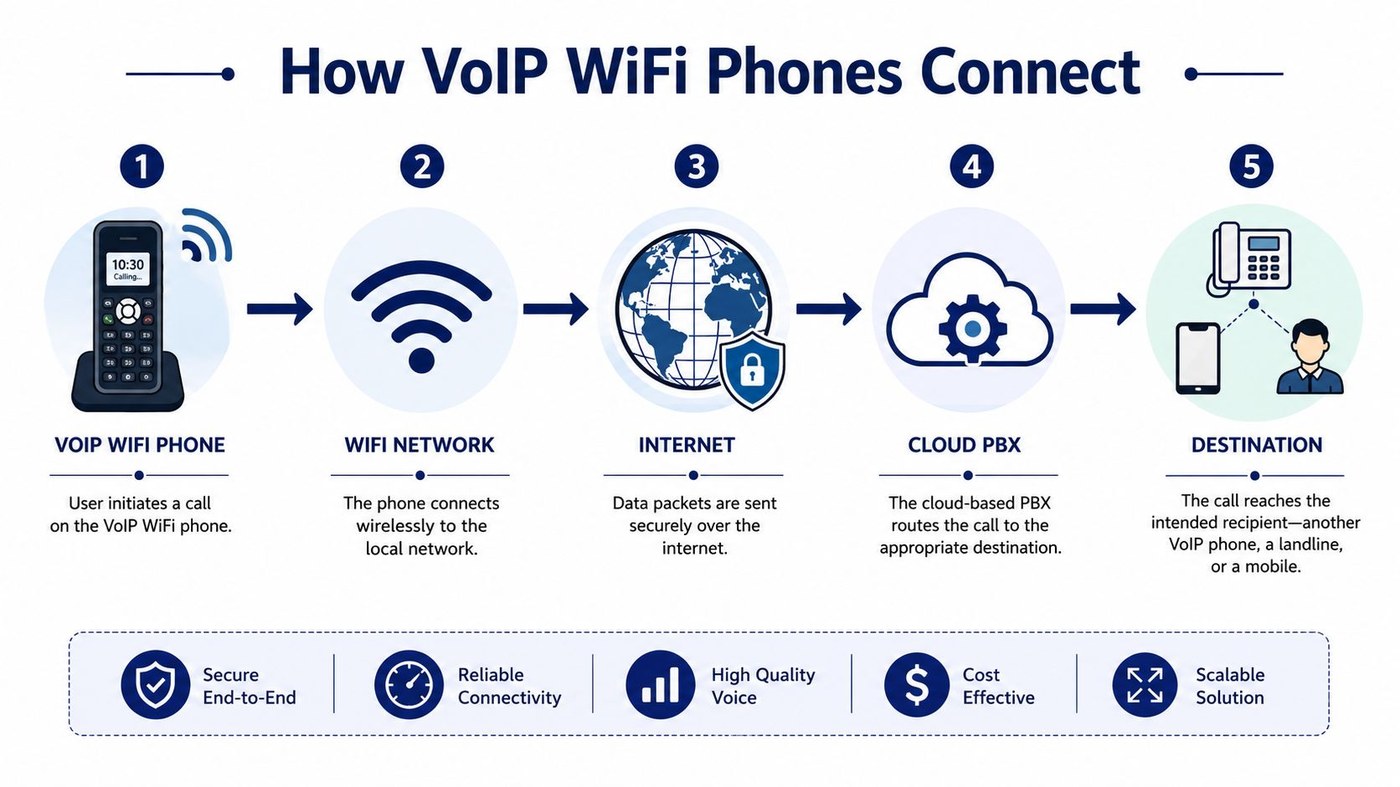
Notice that the handset is only one of five links. This is the single most important lesson in this entire guide. When a wireless deployment disappoints, the phone is rarely the culprit. The weak spot is almost always the WiFi design, the internet connection, or missing traffic prioritization. We will cover how to get each of those right in a moment. First, let's look at the hardware, because 2026 has brought some genuinely impressive options.
Spotlight: the new Yealink SIP-T87W desk phone
The Yealink SIP-T87W is the flagship of Yealink's new T8 series, and it answers a question we hear constantly: can I have a premium executive desk phone without running a cable to it? With built-in WiFi 6 and Bluetooth 5.0, the T87W registers to your cloud phone system over the wireless network, which means you can place it anywhere in the building that has power and coverage.
What sets the T87W apart is what Yealink calls Clean Sound, Clear Calls. It is not a slogan so much as a stack of audio engineering. AI noise cancellation strips background sound from your side of the call, an optimized Acoustic Shield keeps your voice crisp in busy open offices, and a 3-watt speaker delivers professional-grade loudness for speakerphone conversations. On the receiving end, callers hear you, not the copier behind you.
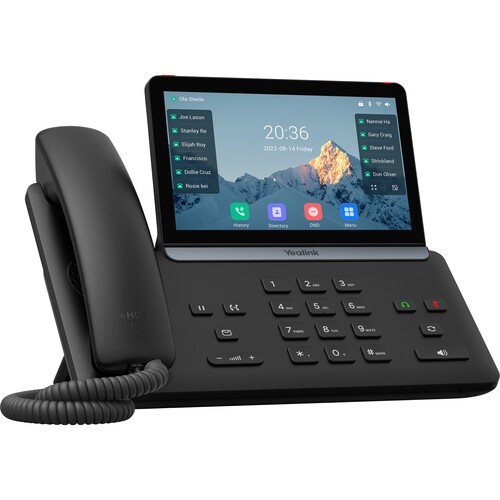
Yealink T87W highlights
- 7 inch 800 x 480 color touch screen with light and dark themes and an accessibility mode
- Built-in WiFi 6 and Bluetooth 5.0, with close-to-pair headset connection and USB headset support
- Clean Sound, Clear Calls audio: AI noise cancellation, Acoustic Shield, and a 3W speaker
- Three Rings of Security: trusted execution environment, WPA3 and 802.1X network protection, and TLS 1.3 with SRTP encrypted transmission
- Line keys, one-touch speed dial, an emergency button, antimicrobial materials, and color-screen expansion module support
Security deserves a special mention. The T87W protects the device itself with secure boot and firmware verification, protects the network connection with WPA3 encryption and 802.1X authentication, and protects the call itself with TLS 1.3 and SRTP. For medical practices, law firms, financial offices, and government agencies, that end-to-end posture is quickly becoming a requirement rather than a luxury.
Spotlight: the Yealink AX83H business WiFi handset
Where the T87W is the executive desk anchor, the Yealink AX83H is built for the people who never stop moving. It is a cordless business WiFi handset designed for offices, hotels, retail floors, clinics, factories, and warehouses, and it solves the problem that has haunted wireless voice for years: dropped audio when you walk between wireless access points.
The AX83H carries dual-band WiFi 6 with seamless 802.11k, v, and r roaming, which means the handset hands off from one access point to the next fast enough that the person on the other end never hears a hiccup. You can start a call at the front counter, walk to the stockroom, and finish in the parking lot without a single dropout, provided your wireless coverage is designed for it.
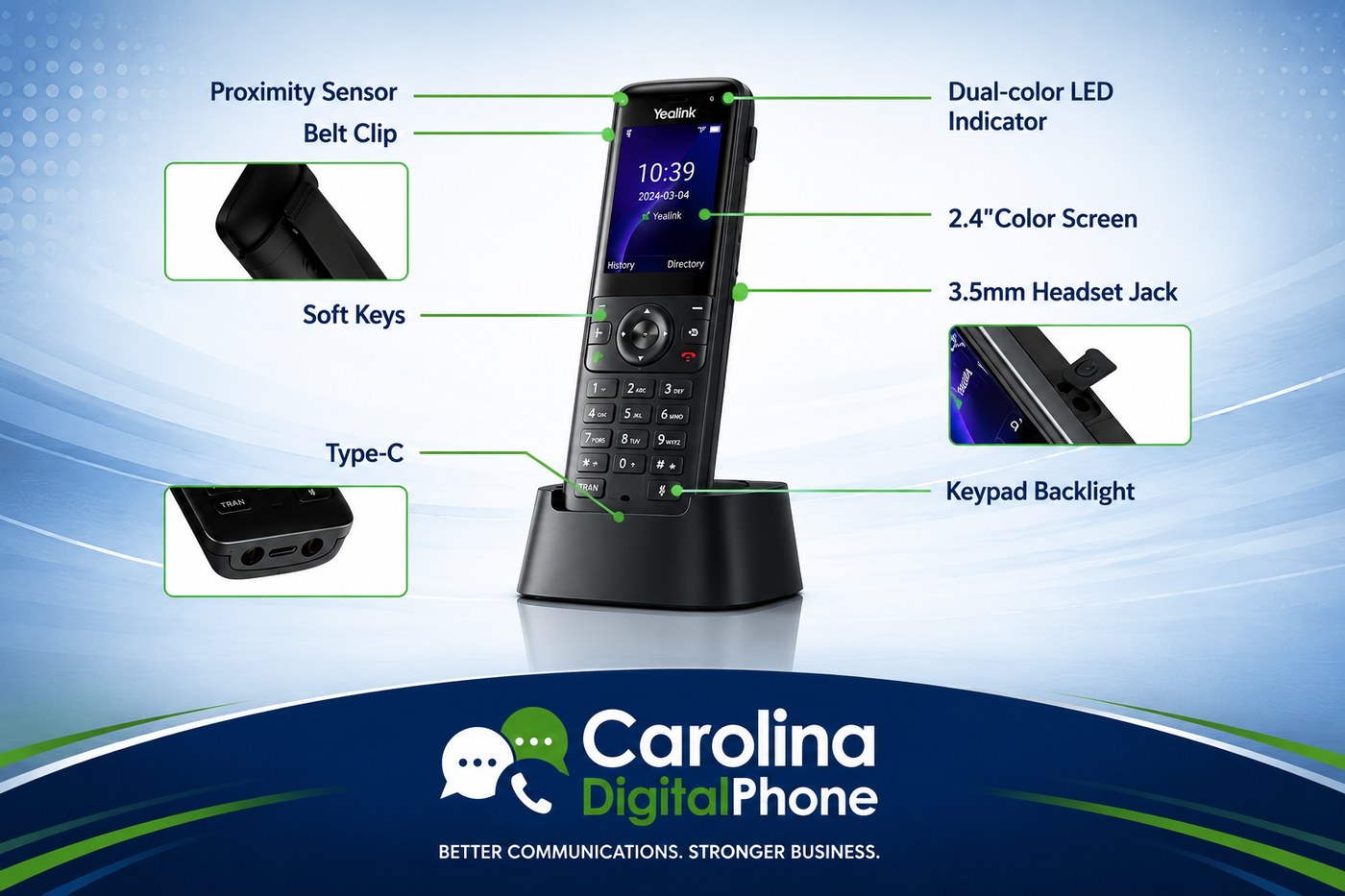
Yealink AX83H highlights
- Dual-band WiFi 6 with seamless 802.11k/v/r roaming for uninterrupted calls on the move
- HD voice with Smart Noise Filtering, full-duplex audio, acoustic echo cancellation, and hearing aid compatibility
- 2000 mAh battery rated for roughly 9 hours of talk time and 200 hours of standby, with quick charging by cradle or Type-C
- 2.4 inch color screen, keypad backlight, vibration alert, proximity sensor, 3.5mm headset jack, Bluetooth 5.0, and a belt clip
- 4 SIP accounts, 5-way conferencing, QR code WiFi setup, over-the-air batch deployment, and TLS 1.3 with WPA3-Enterprise security
Two small details make a big difference in the field. First, batch deployment: a manager can share WiFi credentials to a whole fleet of handsets by QR code or over the air, so rolling out twenty phones does not eat a whole afternoon. Second, the 5-way conference feature lets a mobile supervisor pull four other people into a live call from anywhere in the building, which turns a game of phone tag into a sixty second decision.
What your network needs for crystal clear calls
Here is the honest talk you will not get from a box-mover. A VoIP WiFi phone is only as good as the wireless network under it. Voice traffic is small, but it is unforgiving: packets must arrive quickly, in order, and at a steady rhythm. A network that feels perfectly fine for email and web browsing can still produce choppy, robotic-sounding calls.
The numbers that matter
Plan for roughly 100 Kbps of upload and download per concurrent call, keep round-trip latency under 150 milliseconds, and keep jitter, the variation in packet arrival timing, as low as possible. Common voice codecs use about 80 Kbps per call for full-quality G.711 and about 24 Kbps for compressed G.729. Most modern business internet connections have plenty of raw capacity; consistency is what separates good calls from bad ones.
Quality of Service puts voice at the front of the line
Without traffic prioritization, one large file upload or cloud backup can trample an active phone call. Quality of Service, or QoS, tells your router and switches to treat voice packets as time-sensitive, like an express lane at the grocery store. Voice always has one urgent item; do not make it wait behind a full cart of data.
Roaming is where most deployments fail
If your team will walk while talking, your access points must support the 802.11k, r, and v roaming standards, and they must be configured correctly. These standards let a handset learn which access points are nearby, hand off between them in milliseconds, and choose the best transition on its own. The WiFi 6 standard adds capacity and efficiency on top, which is exactly why both the T87W and the AX83H were built around it. Our rule: never judge a wireless voice deployment from a conference room speed test. Walk the building on a live call, because that is what your staff will do.
A note on security: business phones belong on their own network segment with WPA3 encryption, locked-down provisioning, and controlled admin access. Voice devices carry your most sensitive conversations. Treat them like it.
Where VoIP WiFi phones earn their keep
The value shows up fastest wherever work happens away from a desk. A warehouse supervisor takes supplier calls while walking receiving instead of sprinting back to an office. A dental hygienist gets the front-desk transfer in the operatory instead of the patient hearing "let me see if I can find her." A retail associate answers a product question from the stockroom while standing next to the answer. A school facilities manager stays reachable across three buildings on one extension. Businesses that move to VoIP typically report communication cost savings of 30 to 50 percent, and roughly two thirds of mobile workers report higher productivity and faster problem resolution, which matches what we see with our own clients: mobility removes the delay hiding inside everyday conversations.
Your buyer's checklist before you purchase
When you compare wireless business phones, resist the urge to shop by spec sheet alone. Work through the checklist below and weigh every item against your actual environment: your building, your coverage, your staff, and your phone service.
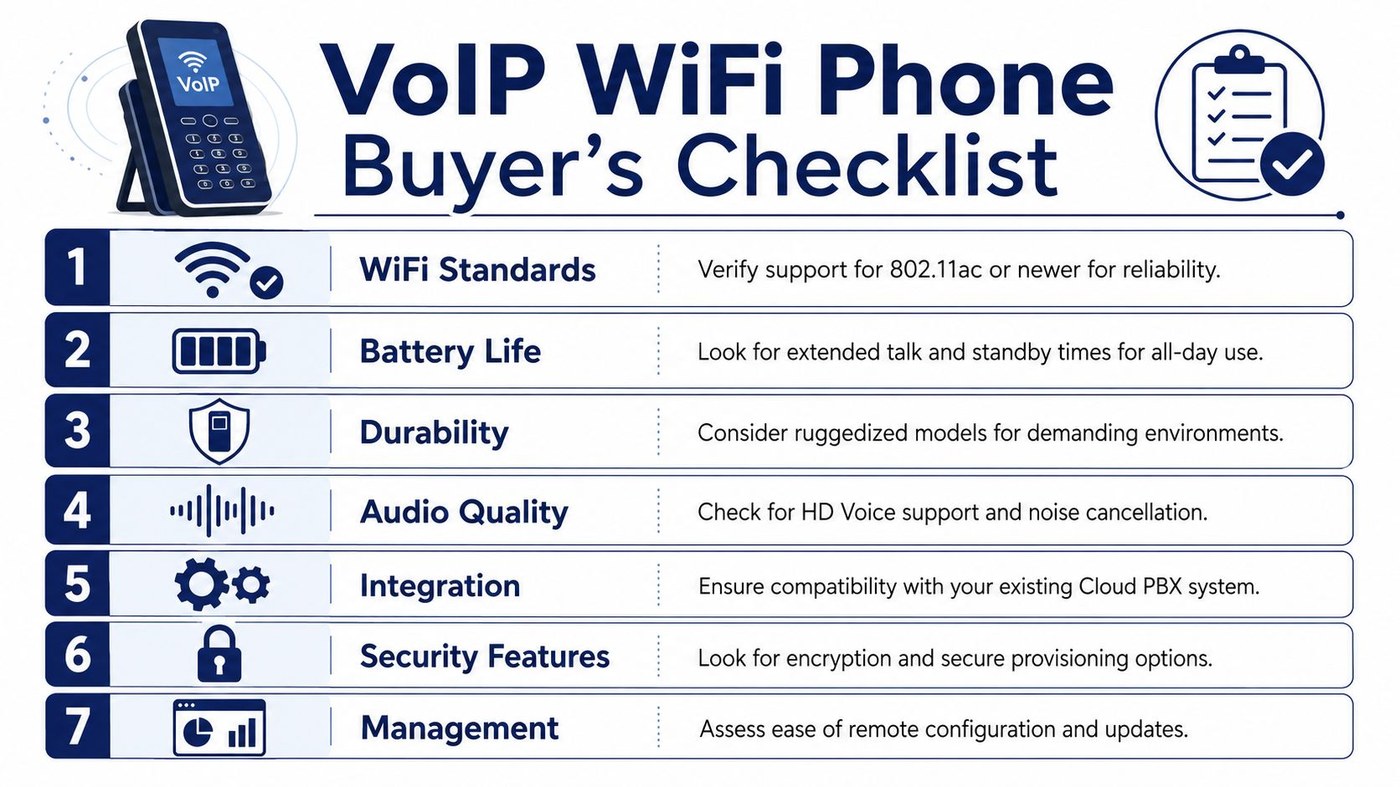
The item most buyers skip is the last one: management. A handset that supports remote provisioning pulls its full configuration the moment it joins the network, which means replacements and reassignments take minutes instead of a service visit. Both Yealink models here provision remotely and can be monitored and updated from a central management platform, so your phone system stays healthy without anyone touching a device.
And the decision most buyers miss entirely: do not buy the handset in isolation. Buy the whole call path. A premium phone on a poorly tuned wireless network will disappoint every time, while a well-matched phone, network, and hosted VoIP service feels effortless. That pairing is a design job, and it is exactly the job a local provider should do for you.
Why buy it from a local team instead of a shipping box
Anyone can sell you a phone. What the national brands cannot ship in the box is the site survey that finds your WiFi dead spots, the QoS configuration on your actual firewall, the roaming tune-up across your real access points, and a senior engineer who answers when something sounds off. That is the difference between hardware and a working system, and it is why businesses across the Carolinas choose Carolina Digital Phone over faceless national providers.
We have been building business phone systems from downtown Greensboro since 2000, and wireless voice is something we deploy every week for offices, schools, clinics, and government agencies across North Carolina, South Carolina, and Virginia. When you call us, you reach experienced local staff, and when the question is technical, a senior engineer joins the conversation without a multi-day escalation queue. There is never a wait to get a senior engineer working on your problem.
If you are replacing a legacy PBX and want a cloud phone platform with IVR, intelligent call routing, mobile-ready calling, call center features, and white-glove setup, take a look at Carolina Digital Phone. The platform is built for growing businesses that need enterprise-grade call handling without making phone administration a full-time job, and the Yealink T87W and AX83H are both fully supported, professionally provisioned, and backed by our local team for the life of your service.