How To Guide
AI Receptionist for Small Business: Calls, Costs, and Fit
A friendly greeting is the easy part. What happens next is the whole job.
Published: | Last updated:
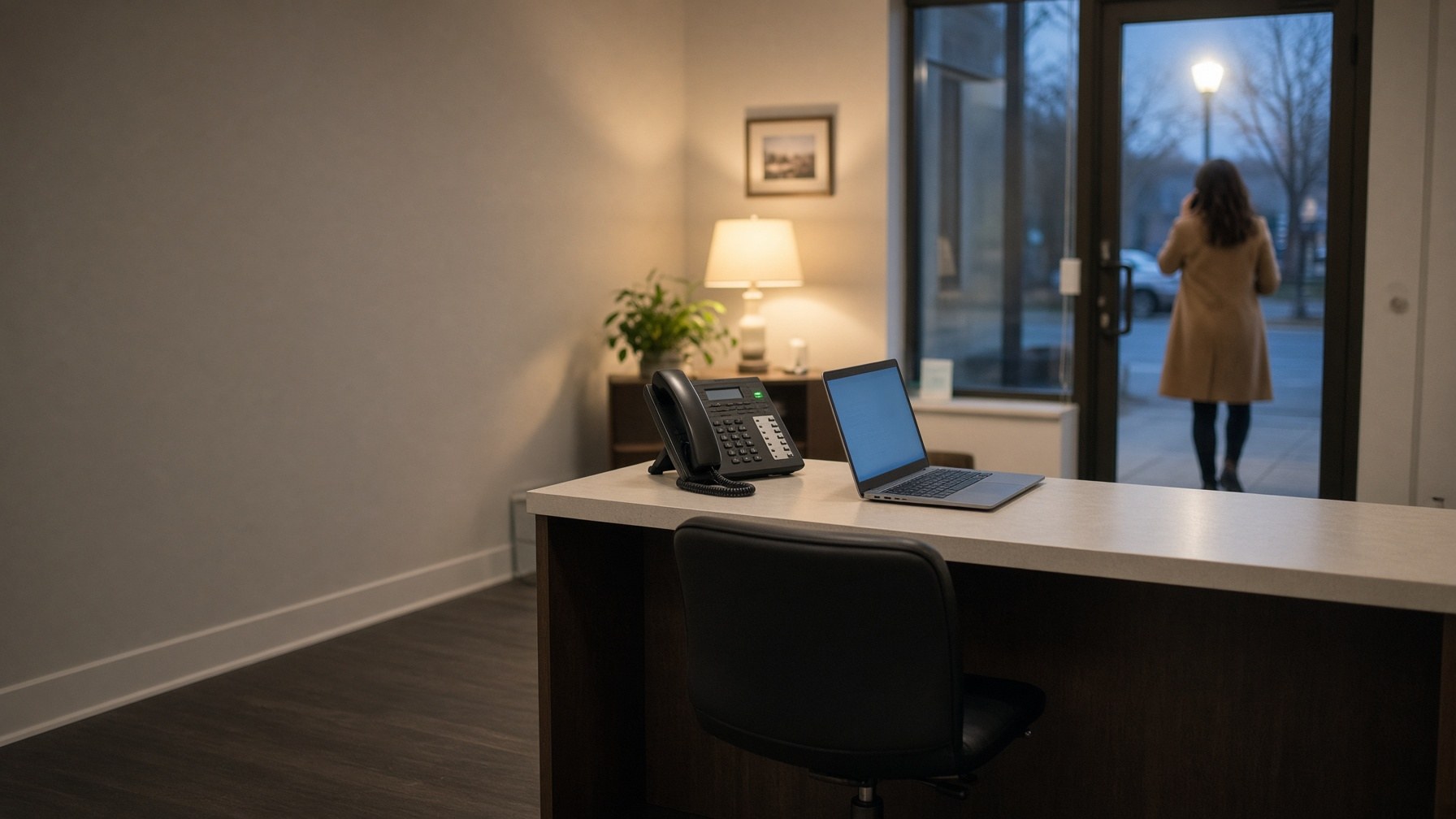
Look at the photograph at the top of this page. It is 6:40 on a weekday evening. The office closed at five. A woman is standing on the sidewalk outside with her phone to her ear, and on the desk inside, one small green light is blinking on a phone that nobody is going to pick up.
She is not calling to complain. She wants to book something, or ask whether you do a certain kind of work, or find out if you can see her this week. In about twenty seconds she will hear your voicemail greeting, hang up without leaving a message, and try the next name on her list. You will never know she called.
That twenty seconds is where an AI receptionist earns its keep, or does not. I opened the first Apple computer store in North Carolina in the early 1980s, and for as long as I have been in this business somebody has been promising that a machine would replace the front desk. First it was the answering machine. Then voicemail. Then the "press 1 for sales" menu. None of them did, and I do not think this one will either. But this one is different in a way that matters, and it is worth understanding before you buy one or decide you never will.
A fair disclosure before we go further. Local Business VoIP is the small-business site of Carolina Digital Phone, Inc., and we sell an AI receptionist ourselves, under the name DigitalPhone.ai. So read what follows the way you would read a mechanic's advice about tires. I will tell you where it works, where it does not, and how to test anybody's, including ours.
Quick answer
An AI receptionist is a good fit for a small business when routine calls interrupt your staff or arrive after closing. Use it for questions with approved answers, appointment requests, and routing callers to the right person. Keep people in charge of complaints, exceptions, and anything that takes judgment. Start with after-hours and overflow calls, and judge it by whether requests get finished and handoffs reach someone who can help, not by how natural the voice sounds.
- AI receptionist
- Software that answers your phone in spoken language, responds from information you approved, completes tasks you allow, and transfers the rest to a person.
- Auto attendant
- The older recorded menu that routes calls by key press. It directs callers but cannot answer a question.
- Handoff
- The moment the AI passes a caller to an employee, ideally along with the caller's name, number, and reason for calling.
- Overflow
- Calls that arrive when everyone is already on the phone and would otherwise go to voicemail.
- Confabulation
- The term the National Institute of Standards and Technology uses when an AI system states something false with confidence.
What does an AI receptionist actually do on a call?
On a call, an AI receptionist does four things in order: it listens to what the caller wants, matches the request to information you have approved, takes an action you have permitted, and hands the call to a person when the request is out of bounds. Everything it can do comes from those three lists you give it: approved answers, permitted actions, and named people to transfer to.
That is a real change from the menu systems most of us grew up with. A caller does not have to guess whether a billing question is option 2 or option 4. They say, "I need to move my appointment to Thursday," and the system either moves it or gets them to someone who can. Carolina Digital Phone's own AI phone agent, for example, answers frequently asked questions, schedules appointments, and routes more involved calls to staff, at any hour.
The trap is in one small distinction: taking a message is not the same as finishing a task. If a caller asks for 10:00 on Tuesday, the system can either reserve that slot on your calendar or simply write down that the caller would like it. Both sound identical on the phone. Only one of them is an appointment. Whichever you have, the caller should be told the truth about what happens next: a confirmed time, a transfer, or a callback.
If you want the plain comparison with the old menu approach, I wrote one in auto attendant versus receptionist.
Is an answered call the same as a finished call?
No. An answered call only means something picked up. A finished call means the caller got what they needed or reached someone who could provide it. Most of the disappointment with these systems comes from buying the first and expecting the second.
Vendors like to quote the percentage of calls answered. It is an easy number to make look good, because software always answers. I would ask about three different outcomes:
- Finished. The question was answered correctly, or the appointment is on the right calendar. Nobody on your staff had to touch it.
- Handed off well. The caller reached a person, and that person already knew who was calling and why.
- Dropped. The caller hung up, got a wrong answer, or was transferred to a phone that rang until they quit.
Only the first two are worth paying for. A system that answers every call and drops a third of them has not solved your missed-call problem. It has hidden it behind a pleasant voice. If missed calls are the reason you are reading this, start with the causes, which I covered in how to reduce missed business calls.
Which calls should go to AI, and which should stay with a person?
Send AI the calls that have one right answer or one clear destination, and keep a person on the calls where the answer depends on judgment, discretion, or the relationship. Decide request by request, not all at once.
| The caller wants | Best handled by | Why |
|---|---|---|
| Hours, address, directions, parking | AI | One correct answer that rarely changes. |
| A new appointment | AI, if it can write to your calendar | Otherwise it only takes a request and a person must confirm. |
| To reach a department or location | AI | A clear destination, and the caller can say it in their own words. |
| A first conversation about buying from you | AI first, then a person | Capture the name, number, and need at any hour. A person follows up. |
| A billing dispute or a refund | Person | Needs account access, judgment, and often an apology. |
| A complaint | Person | An upset customer who gets a machine becomes a lost customer. |
| Medical, legal, or financial advice | The professional | The AI can schedule the conversation. It should never have it. |
| An emergency | 911, or your on-call person | Say so in the first seconds of the greeting. |
For a first step, pick the narrowest useful job:
- A service business can begin with office information and appointment requests.
- A company with several locations can begin with "which office do you need?" and department routing.
- A school can begin with office hours and general contact directions.
- A medical practice can begin with administrative information, and keep every clinical question with clinicians.
Does an AI receptionist replace a receptionist?
No. An AI receptionist replaces the interruptions, not the person. Answering the phone is one slice of what a good front desk does, and it is the only slice the software can touch.
The U.S. Bureau of Labor Statistics counts about 947,500 receptionist jobs in this country. Its occupational profile describes people who greet visitors, give out information, take messages, schedule appointments, and keep files in order, at a median wage of $18.27 an hour, or $38,010 a year. Read that list again. Greeting the person who walks in the door, noticing that a regular customer seems upset, signing for the package, finding the file: none of that happens over a phone line.
So I would not set an AI receptionist's monthly fee beside a salary and call the difference savings. That is the wrong comparison, and vendors who make it are selling you a layoff you will regret. The honest comparison is against the calls you are not answering now: the ones after five, the ones at lunch, and the third call that comes in while your front desk is already juggling two. Your receptionist keeps the job and loses the worst part of it.
What happens when a caller asks for a person?
When a caller asks for a person, the AI should transfer them to the employee or group you named and pass along what it already knows. What happens if that employee is busy is something you have to decide ahead of time, because the software cannot decide it for you.

Here is the arithmetic people miss. An AI receptionist can greet ten callers in the same minute. It cannot create ten employees to take ten transfers. If four of those callers need a person and you have one person, three of them are going somewhere. Your job is to choose where: a second employee, a voicemail box that somebody owns, or a callback with a time attached.
Three rules I would insist on:
- Anyone can ask for a person at any time. No caller should have to argue with software to reach a human being.
- The employee receives the story so far. Name, callback number, what the caller wants, and what has already been tried. If the caller has to repeat everything, the AI added a delay and nothing else.
- Every failed transfer has an owner. Somebody's name is on the callback, and it happens the same day.
Measure the wait for a person separately from the wait for a greeting. The greeting will always be instant. The second number is the one your customers feel. The routing behind all this is the same routing any business phone system uses, which I explained in how to set call routing.
What does an AI receptionist cost?
An AI receptionist's cost is made up of a monthly subscription, an allowance of usage, a rate for going over that allowance, any fees for connecting it to your calendar or other software, and one-time setup. The advertised starting price is only the first of those five, so ask for all of them in writing.
Before you compare quotes, pin down the unit. Some providers bill by the minute, some by the call, some by the number of different callers. Ask how a transfer is counted, whether a ten-second wrong number costs the same as a five-minute booking, and what happens when the same person calls back three times.
Then do the math twice, once for an ordinary month and once for your busiest. Here is the worksheet with example numbers. These are invented for the arithmetic and are not anyone's actual prices, including ours.
| Cost component | Ordinary month (350 minutes) | Busy month (620 minutes) |
|---|---|---|
| Subscription, includes 400 minutes | $150 | $150 |
| Overage at 30 cents a minute | $0 (under the allowance) | $66 (220 extra minutes) |
| Calendar connection | $20 | $20 |
| Monthly total | $170 | $236 |
Notice that the busy month costs nearly forty percent more than the ordinary one, and the busy month is exactly when you will need the system most. A plan that looks cheap in March can look very different in your peak season. Add one-time setup only when you are comparing what the first month will cost.
For the minutes, use the calls that would truly reach the AI, such as after-hours and unanswered calls, not your total call volume. And measure value by work your people no longer repeat: usable messages, appointments that held, transfers that connected, and time spent fixing mistakes. Count new revenue only when your own records tie it to a finished sale. An answered inquiry is not a customer.
Our AI receptionist is priced by quote, because the right plan depends on your call volume and what you want it to do. You can see how we approach pricing on the Carolina Digital Phone pricing page, run your own numbers with the AI return calculator at DigitalPhone.ai, and read our longer guide to what drives an AI receptionist's monthly bill.
How should calendars and caller information be handled?
Calendars and caller information should be handled by deciding, in writing, exactly what the AI is allowed to read, create, and change, and who may see what it records. "It integrates with your calendar" is not an answer until you know which of those it means.
Define each connection by the action it permits:
- Read open times only
- Create a new appointment
- Change or cancel an existing one
- Add or update a customer's contact record
Then watch it happen, in the software your team uses every day, with invented customer details. Check the appointment type, the location, the time zone, and what the system says when the slot is taken.
Recordings and transcripts deserve the same care. Before you turn them on, decide who can listen, how long they are kept, how they are deleted, and how callers are told. Recording laws differ from state to state, so ask your attorney before you record. And if you run a medical or dental practice, know that a cloud vendor handling patient information on your behalf needs a business associate agreement with you, on top of your other duties under HIPAA. The U.S. Department of Health and Human Services explains this in its guidance on HIPAA and cloud computing.
How do you test an AI receptionist before you trust it?
You test an AI receptionist by calling it five times as five different kinds of customer, then looking at what reached your staff. A sales demo shows you the one call the system handles best. These five show you the rest.

-
Call one: ask the easy question
Ask something every caller asks: your hours, your address, whether you take walk-ins. This should be quick and correct. If the answer is slow, padded, or wrong here, stop. Nothing harder will go better.
-
Call two: book something real
Ask for an appointment at a specific day and time, using a made-up name. Then open the calendar your staff actually uses. Is the appointment there, with the right type, the right location, and the right time zone? Or did the system only write down what you asked for? Try a time that is already taken, too.
-
Call three: change your mind halfway
Start a request, interrupt, and correct yourself. Say Tuesday, then say no, make that Thursday. Spell an unusual last name. Real callers ramble, talk over the greeting, and back up. Notice whether the system keeps up or starts over.
-
Call four: ask what it should not answer
Ask for something that needs a person's judgment: a discount, a refund outside your policy, whether a symptom is serious, what your attorney would advise. The right response is some version of I will get you to someone who can help. A confident made-up answer is the failure you are looking for.
-
Call five: ask for a person while that person is busy
Say let me talk to someone, at a moment when the employee who would take the transfer is on another call or away from the desk. Where do you end up? A second person, a voicemail that someone owns, a promised callback? Or ringing that never ends?
-
Score what your employee received
After each call, look at what reached your staff: the caller's name, the callback number, the reason for the call, and anything already attempted. Count how much the caller would have had to repeat. Then run calls two and five at the same moment from two phones, because busy days do not arrive one call at a time.
Call four matters more than the others. The National Institute of Standards and Technology, in its risk profile for generative AI, uses the word confabulation for the habit these systems have of stating false things with complete confidence. A human receptionist who does not know says, "Let me find out." You want software that does the same. The way to get it is to keep the approved answers narrow, put one employee in charge of updating them, and test the questions it is supposed to refuse.
When you read reviews, look for people describing the AI answering service itself: the setup, whether bookings were accurate, what happened when a transfer failed. A phone company's overall star rating tells you about its phone service, which is a different product. I went through the weak spots in detail in AI receptionist limitations and reviewed the category in an AI receptionist review for small and midsize businesses.
Where should a small business start?
A small business should start with the calls nobody is answering now: after hours, lunch, and overflow. Those callers were headed to voicemail anyway, so the worst outcome is no worse than today, and the best is a booked appointment at 6:40 in the evening.
A sensible first month looks like this:
- Pick one group of calls. After-hours only, or overflow only. Leave your daytime routing exactly as it is.
- Keep your current fallback. If the AI cannot help, the caller should land where they would have landed before.
- Say it is an AI in the greeting. People are comfortable with it when they are told, and irritated when they find out.
- Review every week. Read the finished requests and the failed handoffs side by side. The failures tell you what to fix.
- Widen it only when the routine calls finish reliably. Then add a second group of calls, and repeat.
And leave judgment with people. The woman on the sidewalk in that photograph wants an appointment, and software can give her one. The customer who calls angry on Monday morning wants to be heard, and that is still your job. If you are weighing where AI is headed more broadly, I wrote about that in AI trends in phone systems.
Why get an AI receptionist from your phone company?
Getting an AI receptionist from your phone company keeps your number, your call routing, and your AI in one place, with one team responsible when a transfer goes wrong. When the AI and the phones come from different vendors, a failed handoff becomes an argument about whose fault it is.
With us, your existing business number can usually come with you, and our onboarding team in North Carolina works through your frequently asked questions, your hours, and your routing rules with you before anything goes live. The same people are there afterward when you want to change it. That is what I mean by doing business with people you know, like, and trust. You can read more about why businesses choose Carolina Digital Phone, the history of the company, and what it means to have a trusted communications partner. The AI product itself is described at DigitalPhone.ai, and the phone features it works alongside are on our complete feature list.
Whoever you buy from, hold them to the standard in this article. Do not ask how human it sounds. Ask what happens next.
Frequently asked questions about AI receptionists for small business
What is an AI receptionist?
An AI receptionist is software that answers your business phone in natural spoken language, responds to common questions using information you have approved, takes actions you allow such as booking an appointment, and transfers the caller to a person when the request is outside its limits. It works around the clock and can handle several calls at once.
How is an AI receptionist different from an auto attendant?
An auto attendant plays a recorded menu and routes by key press: press 1 for sales, press 2 for service. An AI receptionist lets the caller say what they need in their own words, can answer the question directly, and can complete a task such as booking. Many businesses use both, with the menu as a simple fallback.
Will an AI receptionist replace my receptionist?
No. A receptionist greets visitors, handles mail, manages the schedule, and solves problems that do not fit a script. An AI receptionist only answers the phone. Its best use is taking routine and after-hours calls so your front desk person is interrupted less and can finish the work in front of them.
How much does an AI receptionist cost?
Pricing usually combines a monthly subscription with an allowance of minutes or calls, a rate for usage beyond that allowance, and sometimes fees for calendar or software connections and one-time setup. Ask for every one of those in writing, then price both an ordinary month and your busiest month before you compare providers.
Can an AI receptionist book appointments?
Yes, if it is connected to your calendar with permission to create bookings. Without that connection it can only record the time the caller wants, and a person has to confirm it later. Ask which one you are getting, and test it by booking a made-up appointment and finding it on your real calendar.
What happens when a caller asks to speak to a person?
A well-configured AI receptionist transfers the caller to the employee or group you named and passes along what it has learned so the caller does not start over. You also need to decide where the call goes when that person is unavailable, such as a second employee, a monitored voicemail box, or a promised callback.
Can an AI receptionist give callers wrong information?
It can. Generative AI sometimes produces confident statements that are false, which the National Institute of Standards and Technology calls confabulation. You reduce the risk by limiting the system to answers you have approved, assigning someone to keep those answers current, and testing questions it should hand to a person.
Is an AI receptionist a good fit for a medical office?
It can handle administrative calls such as hours, directions, and appointment requests. Clinical questions belong with clinicians. A practice covered by HIPAA also needs a business associate agreement with any vendor that handles patient information on its behalf, along with its other HIPAA obligations.
Can I keep my phone number with an AI receptionist?
Usually, yes. If the AI receptionist is part of your business phone service, your existing number can be moved to that provider if it is eligible for porting. Carolina Digital Phone offers number porting. Confirm that your specific number can be ported before you change service.
Who sets up the AI receptionist and keeps its answers current?
Your provider should help you build it, and someone on your staff should own it afterward. At Carolina Digital Phone, the onboarding team guides the setup of frequently asked questions, business hours, and call routing rules. After launch, name one employee who updates the answers whenever hours, prices, or policies change.
Should I tell callers they are talking to an AI?
Yes. Say so in the greeting. Callers adjust quickly when they know, and they are far less forgiving when they find out halfway through a call. A short, honest opening also makes it natural to offer a person as an option.
Where should a small business start with an AI receptionist?
Start with after-hours calls or overflow, meaning calls that would otherwise go to voicemail. The risk is low because those callers were not reaching a person anyway. Run it for about a month, review the completed requests and the failed handoffs, and widen its role only if routine calls are finishing reliably.
Wondering whether an AI receptionist fits your office?
Contact the experienced team at Carolina Digital Phone. Bring us your call scenarios, your calendar, and the names of the people who should take the handoffs, and we will tell you plainly what an AI receptionist can take off your plate and what should stay with your staff. If you want to talk to someone right away, call (336) 544-4000. Or ask for a quick call back from a team member.
You can also leave your number at HostedBusinessTelephone.com, get a short evaluation of your phone needs at LocalVoIPProvider.com, or send your details through the pricing request form.