Is your office communication system ready to grow with you?
No one plans a scattered phone system. It happens one workaround at a time: a second location, a manager forwarding calls to a personal cell, one employee living in Teams while another lives in Zoom, and an aging PBX in the back closet that only one person still knows how to reboot. Your customers or constituents never see that mess. They just feel it when a call gets dropped, a message goes unanswered, or nobody is sure who was supposed to follow up.
That kind of friction is usually the moment an owner, office manager, or IT director starts asking a bigger question: not "do we have phones," but "does our communication setup still match how this organization actually operates today." That question matters more every year, because the way people work has changed faster than most legacy phone systems were ever designed to handle.
An office communication system is the connected set of tools, voice, messaging, video, and routing, that decides how a call, text, or message finds the right person, no matter where that person is working from.
The moment growth exposes a weak communication setup
The pattern tends to repeat itself in growing companies and busy public offices alike. The front line rings while the one person who usually answers is helping someone else in person. A field employee misses a time-sensitive update because it landed in the wrong app. By the middle of the day, two or three people have separately asked, "did anyone call the customer back?" None of that shows up as a single dramatic failure. It shows up as friction, and friction compounds.
There is real research behind why that friction costs more than it looks like it should. UC Irvine researcher Gloria Mark's long-running work on workplace attention found that after a single interruption, it takes an average of roughly 23 minutes to fully return to the depth of focus a person had before the interruption. Stack that across a team juggling five disconnected tools for calls, chat, video, and voicemail, and the lost time adds up fast, even when every individual interruption looks small.
From separate lines to one connected hub
A legacy phone system was built around a simpler assumption: everyone works from an assigned desk, on one phone line, inside one building. That assumption does not describe most organizations anymore. Staff move between an office, a home desk, a vehicle, a job site, and a laptop, often in the same day. Customers and constituents still expect one main number to reach the right department quickly, regardless of where that department's staff happen to be sitting.
The shift already underway in the market reflects that reality. Grand View Research values the global unified communications as a service (UCaaS) market at roughly $128.9 billion in 2026, and Gallup's ongoing workplace research finds that among remote-capable U.S. employees, 52% now work hybrid and 27% work fully remote, meaning nearly four in five spend at least part of their week away from a fixed desk. Businesses are not simply replacing handsets. They are moving toward communication environments built for people who do not sit still.
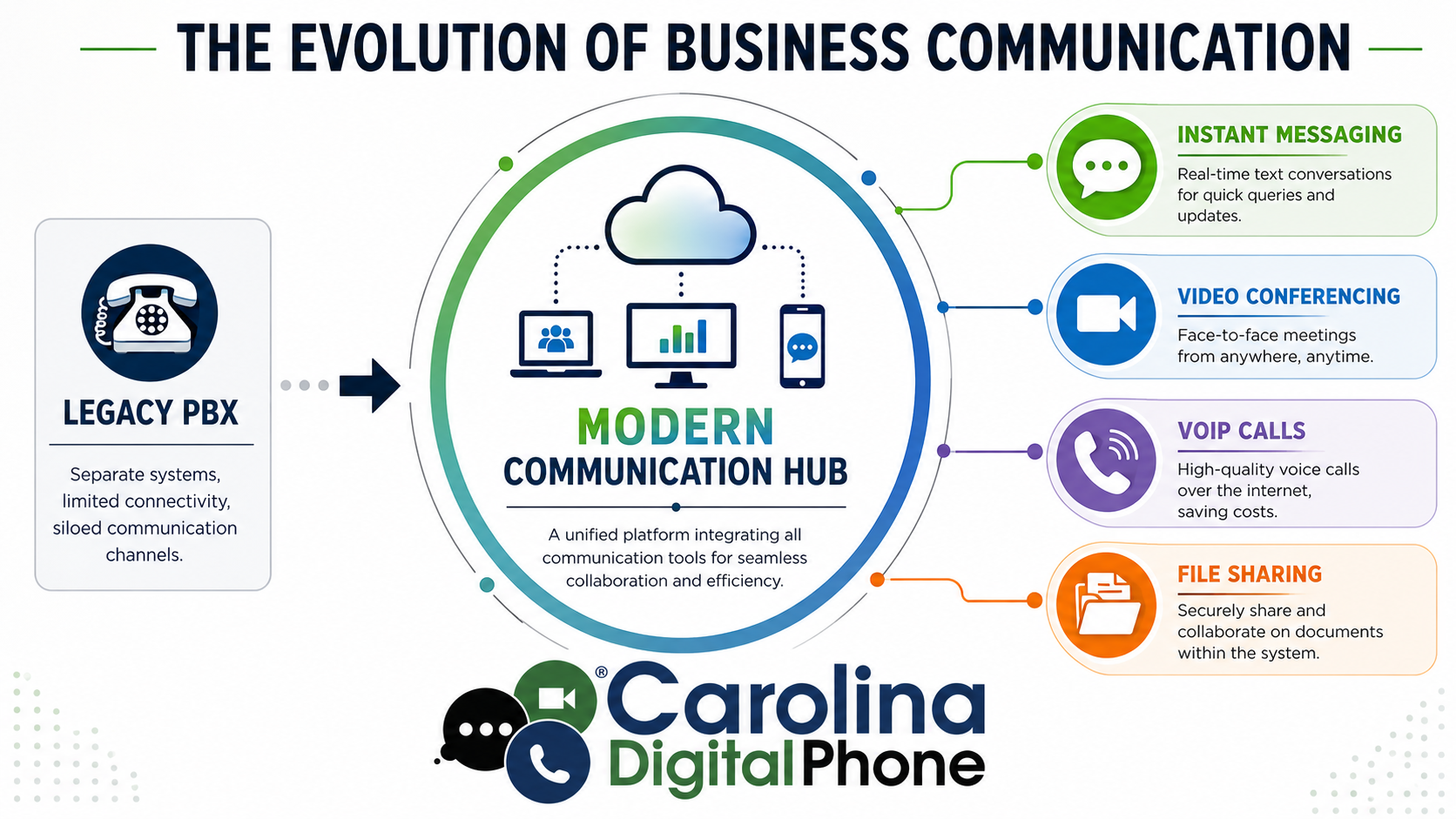
Picture the difference in practice. With an older setup, phone calls live in one system, video meetings live in another, chat messages sit in a third app, and voicemail waits in a separate inbox that someone has to remember to check. Every change, a new greeting, a new user, a new routing rule, tends to require a specialist or a truck roll. A connected hub flips that around. Voice, messaging, video, and user management live in one environment, and staff can move from a desk phone to a laptop to a mobile app without losing the thread of a conversation.
What a unified communications platform actually includes
The acronym UCaaS, short for unified communications as a service, sounds more technical than the idea behind it. It simply means your communications platform is delivered as an online service instead of being locked inside a physical box in a wiring closet. For a growing business or a public agency, that has real, practical effects.
- Admin changes, like a new greeting, holiday hours, or a routing rule, happen in a web portal instead of a service call
- Adding a new employee is a software task, not a hardware project tied to how many physical lines you own
- Remote and in-office staff work from the same platform, with the same caller ID, instead of two disconnected setups
- Voice, video, messaging, and voicemail behave like parts of one system instead of separate tools bolted together
- Multi-location organizations run under one platform instead of stitching separate offices together by hand
Underneath the platform, two ideas do most of the work. VoIP, or Voice over Internet Protocol, carries your voice as data over the internet instead of copper phone lines, the same basic principle that makes email possible for the written word. Cloud PBX is the logic layer that decides where a call goes, how extensions behave, and what happens after hours, hosted off-site instead of sitting in a box on your premises. If you want the fuller technical picture, our companion guide on what hosted VoIP is and how it works walks through the journey a call takes from your voice to the other person's ear.
Not sure whether your current setup counts as a real communication hub or just a pile of tools sitting near each other? Call ☎ (336) 544-4000 and an onboarding specialist will walk through your setup with you, no pressure, just a clear answer.
Why this shift matters more for growing businesses and public agencies
Customers and constituents do not care whether the system behind your phone number is old or new. They care whether someone answers, whether a transfer actually works, and whether your organization feels easy to reach. That is where the return on a better system shows up first.
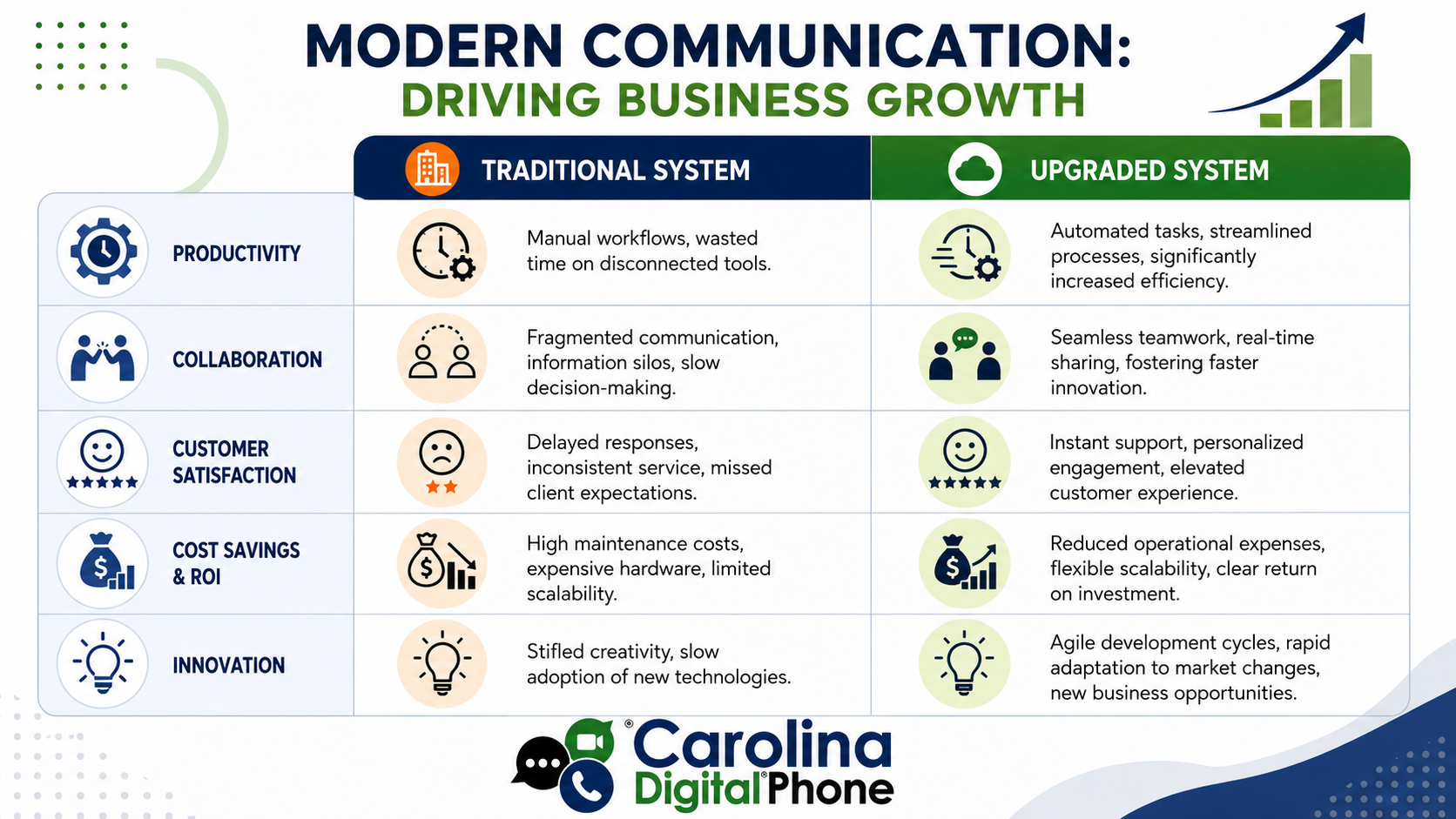
The productivity gain usually comes from removing tool-switching, not from any single flashy feature. When calling, messaging, voicemail, and meetings work as parts of one system, staff spend less time hunting for where a conversation actually lives. That matters even more for hybrid teams, since generic, one-size-fits-all communication setups tend to leave gaps for whichever group is not sitting in the main office that day, whether that is field staff, part-time employees, or remote specialists.
For schools, municipalities, healthcare offices, and other public-facing organizations, the stakes are a little different but no less real. A unified system should make E911 routing and dispatchable location information easier to manage across buildings, not harder, an area shaped by the FCC's Kari's Law and RAY BAUM'S Act requirements for multi-line telephone systems. Healthcare offices handling protected health information over the phone need a platform built around the HIPAA Security Rule, not one that treats compliance as an afterthought. See how we approach this for schools, public sector agencies, and healthcare organizations.
Ten things a modern communication platform should deliver
Feature lists are easy to write and hard to evaluate. What actually matters is whether these ten things show up in your day-to-day operation, not just in a sales deck.
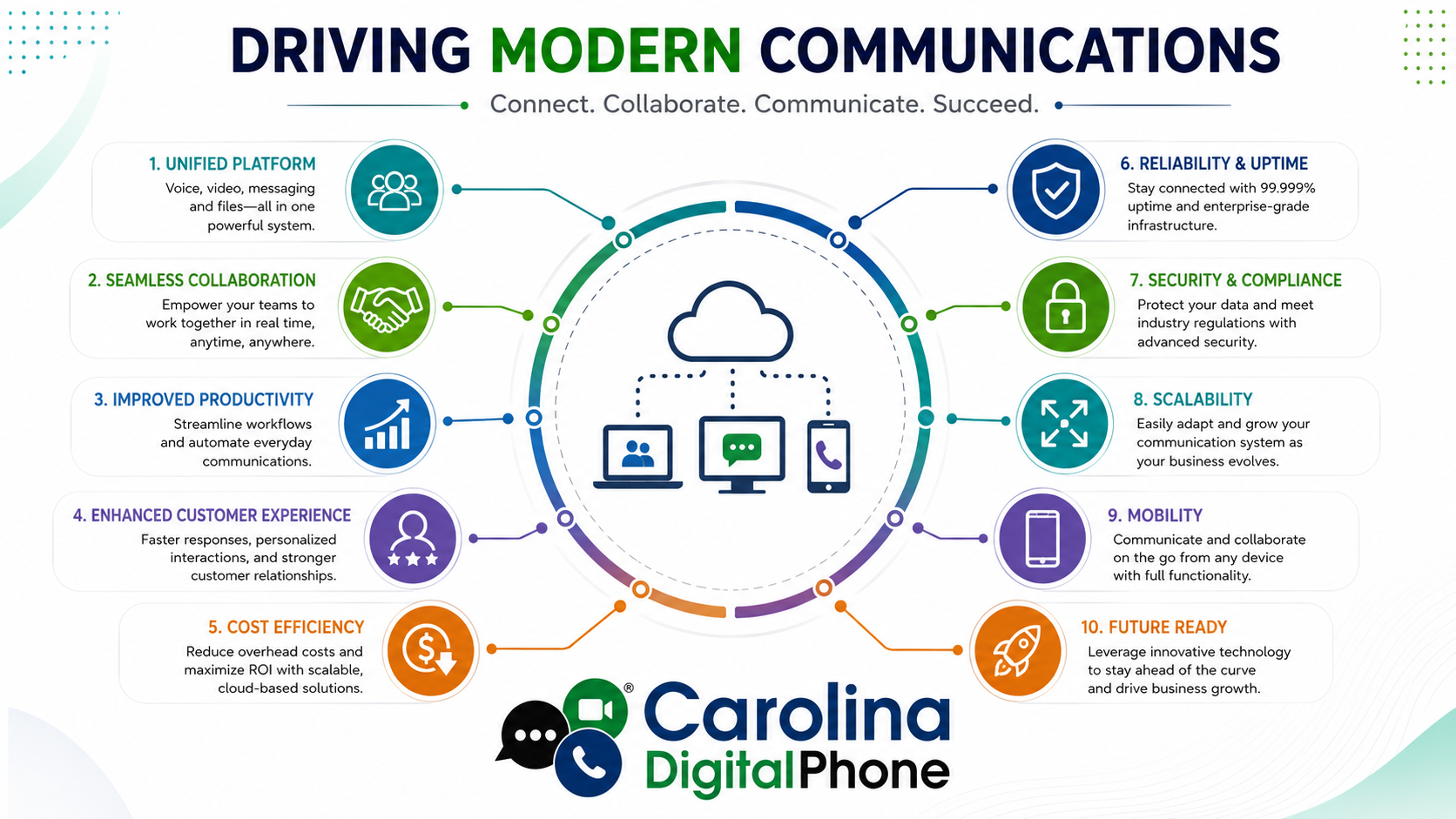
Unified platform
Voice, video, messaging, and file sharing live in one system, so nobody has to remember which app a conversation started in.
Seamless collaboration
Staff work together in real time whether they are down the hall or working from a different city entirely.
Improved productivity
Fewer tools to check means less time lost to context switching and more time spent on the actual work.
Stronger customer experience
Faster answers and smoother handoffs make even a small team sound organized and easy to deal with.
Cost efficiency
Predictable per-user pricing replaces aging hardware, surprise repair bills, and per-line telecom charges.
Reliability and uptime
Geo-redundant infrastructure keeps your main number answering, backed by a documented, tested reliability plan.
Security and compliance
HIPAA-aware handling and E911 support that meet real regulatory requirements, not an afterthought bolted on later.
Scalability
Adding a location, a department, or a new hire should take minutes in a web portal, not a multi-week hardware project.
Mobility
Full features follow your staff to a laptop or mobile app, so the office travels with the person, not the building.
Future readiness
A platform built to add tools like an AI receptionist as they mature, instead of forcing another rebuild.
A practical way to evaluate and migrate without disrupting your team
Choosing a new communication platform is less about chasing the longest feature list and more about finding the right fit for how your organization is actually shaped. A five-person front office, a multi-building school district, and a field-service company all have different pressure points, so evaluation should start with your real operating conditions, not a generic demo script.
A workable migration plan is shorter than most owners expect. Start by auditing what you actually have: users, numbers, existing call flows, and the specific pain points people complain about. Map out how your main line, departments, and after-hours calls should behave going forward. Treat your business numbers as the asset they are, and start the porting process early rather than as an afterthought. Pilot the new system with a small group before rolling it out company-wide, and train each role differently, since a receptionist, a field technician, and a manager will not use the platform the same way. Set a cutover date with real coverage in place, so if someone gets stuck, help is immediate rather than a ticket in a queue.
Ready to map out what a migration would actually look like for your team? Call ☎ (336) 544-4000 and an onboarding specialist will build a plan around your real call flow, your real staff, and your real timeline.
Carolina Digital Phone: local guidance for the switch
Growing businesses, schools, and government offices across North Carolina turn to Carolina Digital Phone when their communication setup stops matching how they actually operate. We build unified voice, business texting, and AI call handling on one platform, backed by a real North Carolina team instead of a distant call center. Carolina Digital Phone has worked in this industry since 2000, led by a founder whose technology career spans more than 45 years, and we have guided organizations of every size through this exact transition without turning it into an IT fire drill.
If you want the fuller picture before you call, read why organizations choose us, learn what hosted VoIP is and how it works, or explore how we serve schools, government agencies, healthcare, construction, and property management teams with the same platform.
Have questions before you commit to anything? Ask them. Call ☎ (336) 544-4000 to talk with a North Carolina onboarding specialist, no pressure, no script, just straight answers about what your organization actually needs.
Office communication systems: frequently asked questions
An office communication system is the combined set of tools, phone calls, voicemail, video meetings, team messaging, and call routing, that an organization uses to reach customers, staff, and partners. A modern system delivers all of that from one connected platform instead of separate, disconnected tools.
They are related but not identical. VoIP is the underlying technology that carries voice calls over the internet. UCaaS, or unified communications as a service, is the broader platform built on top of that technology, adding messaging, video, routing, and user management in one hosted system.
Timelines depend on size and how many numbers need to be ported, but most organizations move in weeks, not months, especially with a pilot group and a planned cutover. A short discovery call is usually enough to map a realistic timeline for your team.
Yes. Schools and public agencies often need multi-site management, E911 compliance under Kari's Law and RAY BAUM'S Act, and centralized control across buildings, all of which a properly configured cloud platform is built to handle.
In almost every case, your existing numbers move with you through a process called number porting. Since your numbers are a core part of your identity, treat porting as an early planning step rather than something to handle at the last minute.
Call an onboarding specialist and describe how your calls, messages, and meetings work today. From there, a realistic plan, covering call flow, number porting, and staff training, gets built around your organization instead of a generic template. Call (336) 544-4000 to start.
Talk to an onboarding specialist about what your business or agency might be missing.
Whether you are a growing business, a multi-site school district, or a public agency ready to move off a fragmented setup, a Carolina Digital Phone onboarding specialist will walk through your real call flow and show you what a unified platform would look like for your team. Transparent pricing, 99.99% uptime, and a local North Carolina team that answers the phone. No obligation, no scripts, just answers.
Request a free consultation